One box handling everything: LLM inference, Nextcloud, a full monitoring stack. Built around an AMD EPYC 7F52 (16 cores) in a Jonsbo N5 NAS case, with an AMD Instinct MI50 doing the inference work.
Why Proxmox
Type-1 hypervisor, open source, web UI that doesn’t require memorising qemu flags every time I want to resize a disk. The bigger reason was native LXC support alongside full VMs; most of my workloads are Linux services that don’t need full hardware emulation, and containers are noticeably lighter and faster to clone than VMs. Running both on the same host without extra tooling was the main draw.
Hardware
- AMD EPYC 7F52: 16 cores / 32 threads, single socket
- AMD Instinct MI50: 32 GB HBM2, gfx906 (LLM inference)
- 2x NVMe (Proxmox root + hot-tier guest disks)
- 2x HDD (cold-tier storage, Nextcloud bulk)
- Jonsbo N5 NAS case
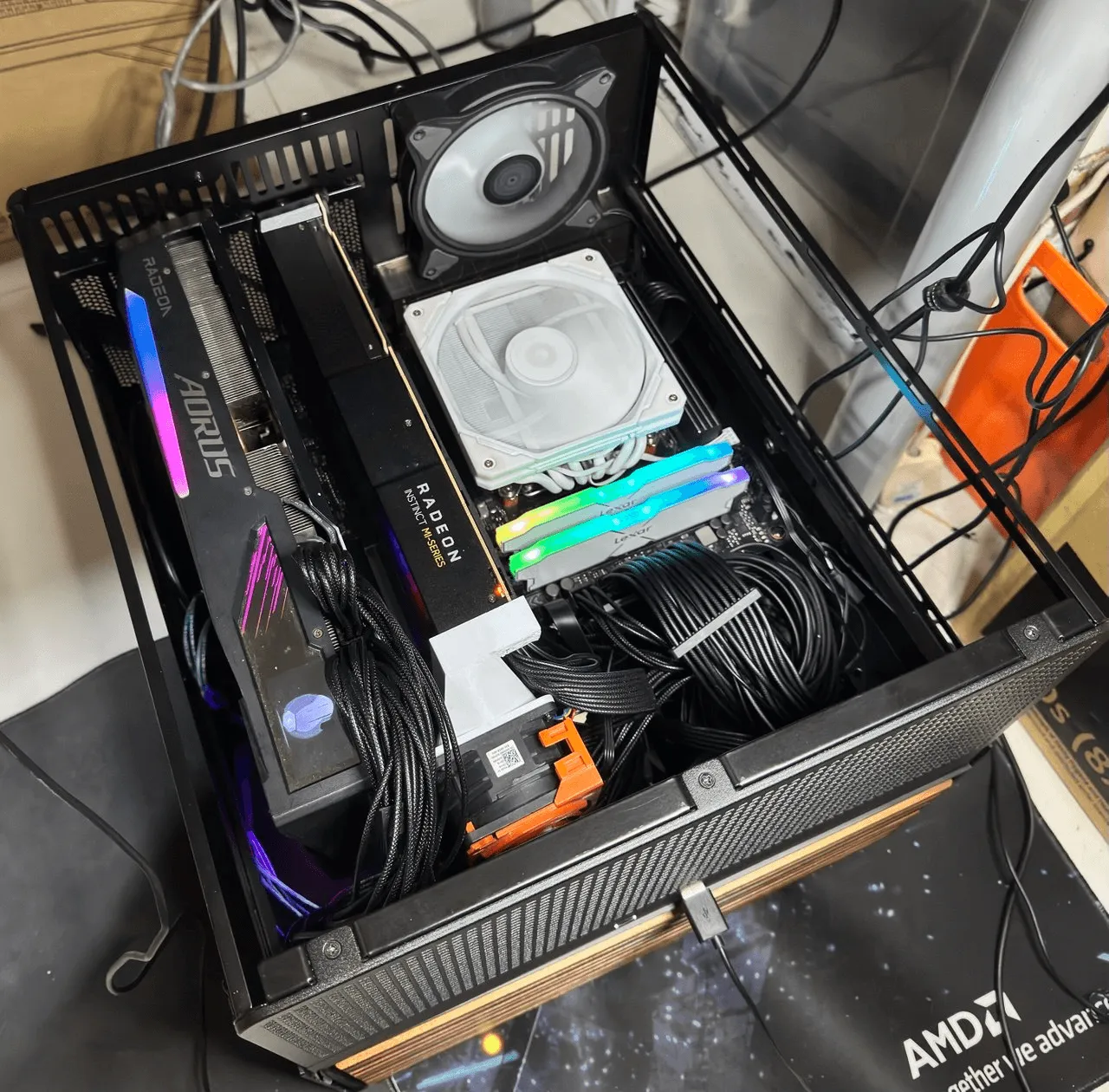
Platform upgrade, 2026-09This box was previously a Ryzen 7 7700 running a second GPU passed through to a Windows VM for gaming. Both the Windows VM and that second card were retired during the motherboard swap to the current single-socket EPYC platform; this page now describes the current single-GPU state, not the earlier dual-GPU one.
GPU sharing across containers
Sharing the MI50 between LXC containers is simpler than it sounds. Both ubuntu-llm and ubuntu-ai get it via bind-mount; the host exposes /dev/dri and /dev/kfd directly into each container. ROCm doesn’t need kernel modules in the guest; it talks to the host amdgpu driver through those character devices.
LXC GPU access is not automaticGetting ROCm working inside a privileged LXC container required manually setting cgroup device permissions for
/dev/dri/renderD128and/dev/kfd. Proxmox doesn’t configure this automatically. I baked the permissions into a base template, new AI containers clone from it and have GPU access from first boot.
What runs on it
ubuntu-llm: serving Qwen 3.6 35B on the MI50, via a custom-compiled ROCm build of llama.cpp. The official ROCm builds don’t run cleanly on the MI50’s older Vega 20 (gfx906) architecture, so this had to be compiled from source specifically for it.ubuntu-ai: AI dev environment, shared MI50.cloud-desktop: a remote development VM.nextcloud: file storage and sync, on the cold-tier HDDs.nginxproxymanager: reverse proxy and TLS.influxdb+grafana: time series metrics and dashboards watching the whole stack.- A couple of standing VMs for club/community work: agent workloads tied to a GDG Singapore workshop, and infra for the NTU Semiconductor Club.
Tailscale runs on the host as both an exit node and a subnet router. Every device on the Tailnet can reach any guest without VPN config in the guests. The Proxmox web UI is behind Tailscale only, never exposed to the LAN bridge.
Verified live, 2026-09-09Checked directly over SSH rather than assumed from memory: CPU, GPU, and every running container/VM listed above reflects the box’s actual current state.
Hypervisor Topology & Resource Partitioning
┌────────────────────────────────────────────────────────────────────────────────────────┐
│ PROXMOX VE 8.x HOST (AMD EPYC 7F52 • 16C/32T • 128GB DDR4 ECC • Jonsbo N5)             │
│                                                                                        │
│   ┌────────────────────────────────────────────────────────────────────────────────┐   │
│   │ Tailscale Mesh Router • Linux Kernel 6.8+ (amdgpu / kfd drivers)               │   │
│   └───────────────────────────────────────┬────────────────────────────────────────┘   │
│                                           │ Hardware Character Passthrough             │
│                     ┌─────────────────────┴─────────────────────┐                      │
│                     ▼                                           ▼                      │
│   ┌───────────────────────────────────┐       ┌────────────────────────────────────┐   │
│   │ AMD Instinct MI50 (32GB HBM2)     │       │ Storage Hierarchy                  │   │
│   │ • /dev/kfd (Major 511)            │       │ • NVMe Pool: Proxmox root & VM OS  │   │
│   │ • /dev/dri/renderD128 (Major 226) │       │ • HDD Mirror: Cold Nextcloud data  │   │
│   └─────────────────┬─────────────────┘       └─────────────────┬──────────────────┘   │
│                     │                                           │                      │
│         ┌───────────┴───────────┐                   ┌───────────┴───────────┐          │
│         ▼ cgroup bind-mount     ▼ cgroup            ▼                       ▼          │
│   ┌───────────────┐       ┌───────────────┐   ┌───────────────┐       ┌───────────────┐│
│   │ CT 101 (LXC)  │       │ CT 102 (LXC)  │   │ CT 103 (LXC)  │       │ CT 104 (LXC)  ││
│   │ `ubuntu-llm`  │       │ `ubuntu-ai`   │   │ `nextcloud`   │       │ `npm-proxy`   ││
│   │ vLLM / ROCm   │       │ Dev & PyTorch │   │ FastCGI/PHP   │       │ Nginx TLS     ││
│   └───────────────┘       └───────────────┘   └───────────────┘       └───────────────┘│
└────────────────────────────────────────────────────────────────────────────────────────┘
Stack
- Proxmox VE (single node, not clustered)
- ROCm (host driver, bind-mounted into LXC), custom-compiled for the MI50’s Vega 20 architecture
- llama.cpp & vLLM (custom ROCm builds, gfx906 target)
- LXC containers: ubuntu-llm, ubuntu-ai, nextcloud, nginxproxymanager
- InfluxDB + Grafana (monitoring)
- Tailscale (remote access + subnet routing)
Milestone UpdateThe vLLM migration benchmark mentioned in early planning has landed: we ported continuous-batching vLLM to the MI50, achieving 13.55× higher throughput over llama.cpp. Full write-up, kernel patches, and benchmarks are documented in MSN-014: AMD Instinct MI50 vLLM Port & Container Passthrough and our multi-GPU expansion in MSN-015: Heterogeneous AMD Tensor Parallelism Engine.